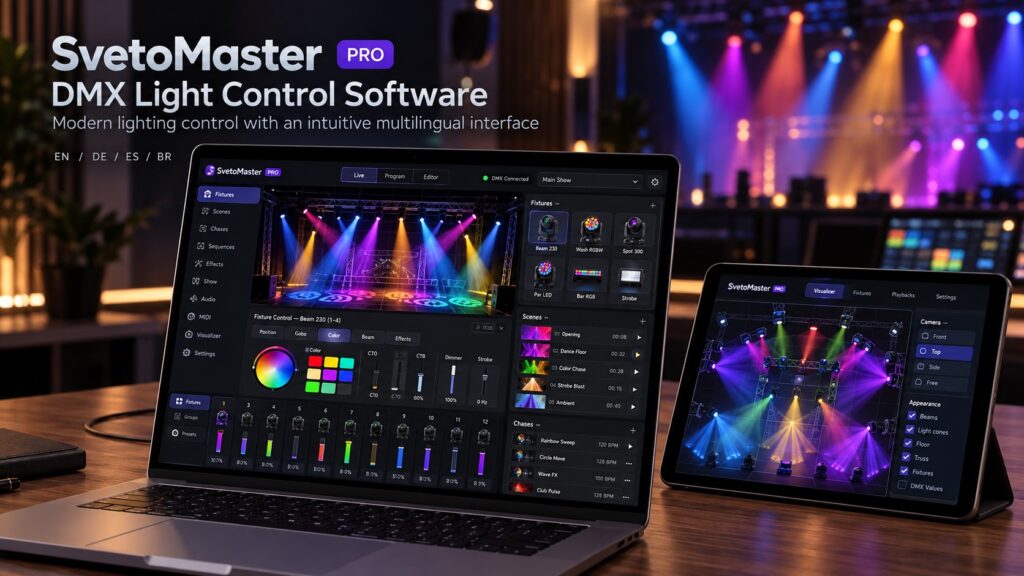
DMX light control software turns a computer into a complete lighting controller. Instead of programming every fixture from a hardware console, you can connect your lights to a laptop or desktop PC, patch the fixtures in software, create scenes and effects, and send DMX commands directly to the rig.
For DJs, bands, theatres, churches, clubs, event venues and lighting installers, this has changed the way smaller and medium-sized lighting systems are built. A modern PC can control moving heads, LED PARs, wash lights, strobes, dimmers and other DMX512 fixtures while also providing visualization, effects, music synchronization and show programming.
The difficult part is no longer finding DMX software. There are many programs available. The real question is choosing DMX lighting software that matches your equipment, your experience and the way you actually work.
What is DMX light control software?
DMX512 is the standard communication protocol used by a huge range of professional and semi-professional lighting equipment. Each fixture listens to one or more DMX channels. A simple RGB light may need only a few channels, while a moving head can use dozens for functions such as:
- dimmer level;
- red, green, blue and white color channels;
- pan and tilt;
- gobos;
- prisms;
- focus and zoom;
- strobe;
- movement speed;
- special effects.
DMX light control software provides a visual layer above these raw channel values. Instead of remembering that channel 17 controls pan and channel 23 controls the blue LED, you work with named fixtures and understandable controls.
Good software therefore feels less like editing numbers and more like designing a lighting show.
How does computer-based DMX lighting control work?
A basic computer-controlled lighting system normally contains four elements:
- A PC or laptop running the lighting software.
- A DMX interface such as USB-DMX, Art-Net or sACN hardware.
- DMX cables or an Ethernet network carrying the control data.
- DMX-compatible lighting fixtures.
For a small setup, the most common arrangement is:
PC → USB-DMX interface → first fixture → second fixture → third fixture
For larger installations, the computer may send Art-Net or sACN through a normal Ethernet network to one or more DMX nodes located closer to the fixtures.
What should good DMX lighting software do?
The best DMX light control software should make routine programming faster rather than simply exposing hundreds of channels on screen.
Fixture profiles
A fixture profile describes how a particular lighting fixture uses its DMX channels. Once the correct profile is loaded, the software knows which channel controls dimmer, color, pan, tilt, strobe and other parameters.
This becomes particularly important with moving heads, where a single fixture can have many operating modes and dozens of DMX channels.
Scenes and presets
A scene stores a lighting state. For example, you might create:
- a warm static stage look;
- a blue ambient scene;
- a bright white speaker scene;
- a colorful dance-floor scene;
- a dramatic moving-head position.
Scenes let you recall complex combinations instantly instead of moving individual faders every time.
Chases and effects
Chases automate sequences of scenes or fixture parameters. They are useful for color changes, dimmer patterns, strobes and rhythmic lighting.
More advanced programs can generate movement effects for moving heads and automatically create circles, sweeps and other pan/tilt patterns.
Fixture groups
Once a rig contains many lights, selecting fixtures one by one becomes inefficient. Groups allow the operator to control, for example, all moving heads, all front lights or all fixtures on one side of the stage together.
Visualization
A visualizer can show an approximate representation of the lighting show before the actual fixtures are connected.
This is especially useful when programming moving heads. You can work on positions, movement and colors at home or in an office and make final adjustments when you arrive at the venue.
SvetoMaster: modern DMX light control software for Windows
SvetoMaster is a modern DMX lighting control program designed for Windows 10 and Windows 11. Its main goal is to combine professional lighting functions with an interface that remains understandable for people who do not spend every day behind a lighting console.
The program supports both simple lighting installations and significantly larger projects, with support for up to 64 DMX universes.
Its workflow includes fixture patching, fixture groups, scenes, chases, effects, BPM tools, moving-head control and visualization.
For moving fixtures, SvetoMaster supports 16-bit parameters and can create pan/tilt movement patterns without requiring the user to manually enter hundreds of coordinate values.
A more approachable interface
Traditional lighting software often copies the logic of professional hardware consoles. That is useful for experienced operators, but it can make a relatively simple lighting system unnecessarily difficult to learn.
SvetoMaster takes a different approach. Common operations are presented visually, allowing a new user to understand what a fixture is doing without first memorizing console terminology.
This makes it suitable both for people building their first DMX system and for experienced users who simply want to create shows faster.
Interface in multiple languages
Lighting software is much easier to learn when the interface and documentation are available in the user’s own language.
SvetoMaster is available with localized interfaces and documentation for:
- English;
- German;
- Spanish;
- Brazilian Portuguese.
This is particularly useful for installations where the software may be used by different technicians, venue employees or volunteers rather than one dedicated lighting programmer.
Large fixture library
SvetoMaster includes a fixture library containing more than 10,000 profiles. Fixtures that are not already present can also be configured manually.
The software can additionally work with fixture profiles imported from established lighting ecosystems, including QLC+ and FreeStyler formats.
USB-DMX and network lighting control
SvetoMaster supports several common ways of sending DMX data from a computer, including:
- USB-DMX interfaces;
- uDMX-compatible devices;
- FTDI-based interfaces;
- Enttec-compatible hardware;
- Art-Net;
- sACN.
This allows a small lighting rig to begin with a simple USB adapter and later move to Ethernet-based DMX distribution without necessarily replacing the lighting software.
DMX light control software for moving heads
Moving heads are where the advantages of fixture-aware software become particularly obvious.
A moving head may contain separate channels for coarse and fine pan, coarse and fine tilt, dimmer, shutter, color wheel, gobo wheel, prism, zoom and focus. Controlling these functions as ordinary DMX sliders is possible, but it becomes tedious very quickly.
Good moving-head software represents these parameters visually and lets you reuse positions and movement patterns across multiple fixtures.
For a DJ or small stage operator, this means you can create effects such as:
- slow synchronized sweeps;
- opposite movement between fixture groups;
- circles and figure-eight movement;
- audience sweeps;
- stage-focused static positions;
- movement synchronized to musical tempo.

DMX software for DJs
DJs usually need a different workflow from theatre lighting programmers. The lighting show changes continuously and often needs to react to music rather than follow a fixed cue list.
Useful features for DJ lighting include:
- BPM detection and synchronization;
- quick access to scenes;
- color presets;
- moving-head effects;
- strobe control;
- fixture groups;
- easy switching between looks.
A visual interface is particularly valuable here because the operator may also be managing music, microphones and other equipment at the same time.
DMX lighting software for churches and houses of worship
Church lighting often needs to be powerful enough for modern LED and moving-head systems but simple enough for volunteers to operate reliably.
A common approach is to let an experienced user create the fixture setup and scenes, while regular operators simply recall predefined looks for worship, speaking, music and special events.
For this type of installation, simplicity and repeatability can be more important than having every advanced console function available.
DMX software for theatres and small stages
Small theatres often sit between two worlds. They may need precise scenes and repeatable cues, but buying and maintaining a large professional console may not be practical.
A PC-based lighting system can provide an effective middle ground, especially when the venue already owns a suitable computer.
Scenes can be prepared in advance, lighting states can be reproduced reliably, and the operator can see the fixture setup directly on screen.
DMX control for clubs, bars and event venues
Permanent venues often benefit from computer control because the same fixtures are used repeatedly.
Once the rig has been patched correctly, a library of scenes can be prepared for different situations: normal operation, live music, DJ nights, private events and maintenance.
Art-Net or sACN can also simplify installations where the control computer and the lights are located far apart.
USB-DMX or Art-Net?
Neither method is universally better.
Choose USB-DMX when:
- the rig is small;
- the controller is close to the lights;
- you only need one or a few universes;
- simplicity is more important than network scalability.
Choose Art-Net or sACN when:
- you need several DMX universes;
- fixtures are distributed across a large venue;
- the installation already has an Ethernet network;
- you want DMX nodes located close to the lighting equipment.
Many modern systems use both. A technician may use USB-DMX for portable work and Art-Net for larger permanent installations.
How many DMX channels do you need?
One DMX universe provides 512 channels.
A simple RGB fixture might use three to eight channels, while a feature-rich moving head can use twenty, thirty or more.
For example, ten 24-channel moving heads already use 240 DMX channels before adding wash fixtures, strobes or other equipment.
This is one reason to consider future expansion when choosing lighting software. Even if the first setup uses one universe, support for multiple universes can avoid having to change software later.
Can AI help create DMX lighting shows?
AI-assisted lighting control is beginning to appear in modern software. The most useful approach is not to let an algorithm take over the show completely, but to use it as a programming assistant.
SvetoMaster includes an optional AI assistant that can help create scenes, chases and color ideas from ordinary language.
For example, an operator can describe a look as warm, energetic, romantic, cold, minimal or colorful and use the generated result as a starting point.
The operator remains in control and can edit the result before using it in a real show.
How to choose the best DMX light control software
Before downloading a program, answer a few practical questions.
1. Does it support your operating system?
Some lighting programs are Windows-only, some are cross-platform and some focus primarily on macOS.
2. Does it support your DMX interface?
This is one of the most important checks. Hardware compatibility varies significantly between programs.
3. Are your fixtures available?
A large fixture library can save hours of manual configuration.
4. Can you understand the interface?
A technically powerful program is not useful if every simple change requires searching through documentation.
5. Will the system grow?
Think about future fixtures, additional universes and network DMX before choosing software that supports only your current setup.
Is PC-based DMX control reliable enough for live events?
Yes, provided the system is configured correctly.
PC-based lighting control is widely used for performances, venues, installations and mobile events. Reliability depends not only on the software but also on the computer, interface, USB connection, network configuration and cabling.
A dedicated lighting computer is preferable for important shows. Disable unnecessary background software, use reliable DMX hardware and test the complete system before the event.
Do you still need a physical DMX console?
Not necessarily.
A console remains an excellent tool for touring professionals and environments where dedicated hardware controls are important. But for many installations, computer software offers several advantages:
- lower cost;
- large display;
- easy project storage;
- visual fixture management;
- software updates;
- integrated visualization;
- easy expansion through Art-Net and sACN.
MIDI controllers or other physical control surfaces can also be added when tactile controls are needed.
Try DMX lighting software with your own fixtures
The best way to judge any DMX light control software is not by screenshots or specifications. Connect it to the equipment you actually use.
Patch a moving head. Create a scene. Build a chase. Try a movement effect. Change a fixture address. See how long each operation takes and whether the workflow still makes sense when you are working quickly.
SvetoMaster offers a full-featured trial so you can test the software with your own lighting equipment before deciding whether it belongs in your setup.
Turn your Windows PC into a modern DMX lighting controller. Try SvetoMaster with your own fixtures, USB-DMX interface or Art-Net network.
DMX Light Control Software FAQ
What is DMX light control software?
DMX light control software is a computer program used to control DMX512 lighting fixtures such as moving heads, LED PARs, wash lights, strobes and dimmers through a USB-DMX interface or network protocol such as Art-Net or sACN.
Can I control DMX lights from a laptop?
Yes. A laptop running DMX software can control professional lighting through a compatible USB-DMX interface, Art-Net node or sACN network.
What is the easiest DMX lighting software to learn?
For Windows users, SvetoMaster is designed around an accessible visual workflow and is suitable for both beginners and more advanced lighting systems.
Does DMX lighting software work with moving heads?
Yes. Fixture-aware programs can control pan, tilt, dimmer, color, gobos, prism, focus, zoom, strobe and other moving-head functions.
Can one computer control multiple DMX universes?
Yes. Multi-universe software can send several universes through compatible USB hardware or network protocols such as Art-Net and sACN. SvetoMaster supports systems with up to 64 universes.
Is there DMX lighting software in different languages?
Yes. SvetoMaster provides localized interfaces and documentation in English, German, Spanish and Brazilian Portuguese.