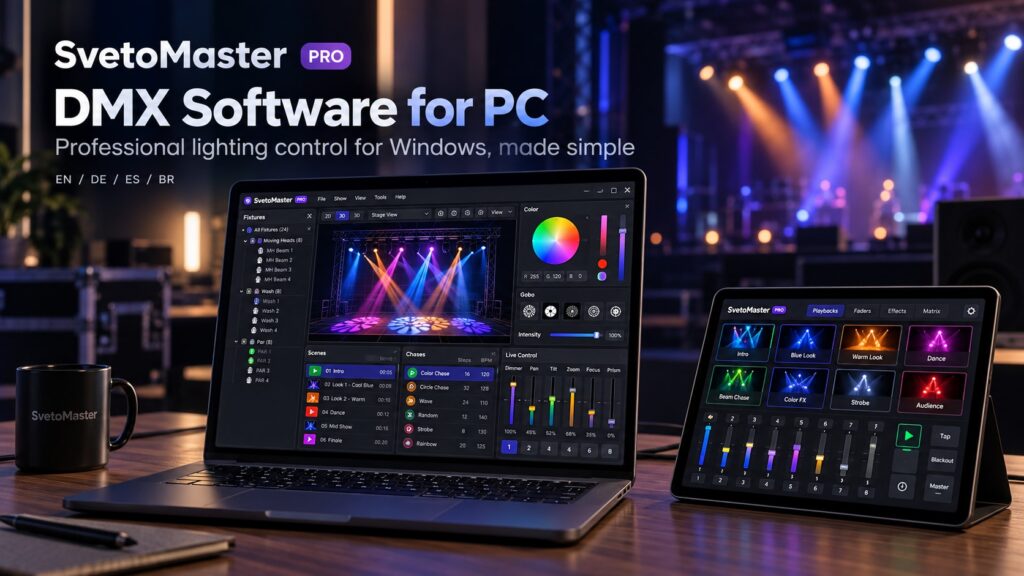
If you already own a Windows laptop or desktop, turning it into a lighting controller is surprisingly straightforward. With the right DMX software for PC and a compatible DMX interface, the same computer can control moving heads, LED PARs, wash lights, strobes, dimmers and complete stage-lighting systems.
For many DJs, bands, theatres, churches, clubs and event companies, a PC has become a practical alternative to a traditional DMX console. Modern software offers fixture libraries, scenes, chases, effects, visualization and network DMX while remaining much easier to update and expand than fixed hardware.
This guide explains what you need, how the different connection methods work, and what to look for when choosing DMX software for Windows.
What do you need to control DMX lights from a PC?
A basic PC lighting setup is made from three main components:
- a Windows PC or laptop;
- DMX control software;
- a way to send DMX data to the fixtures.
The final connection can be made using a USB-DMX adapter, an Ethernet-based Art-Net node or an sACN-compatible interface.
The simplest setup usually looks like this:
Windows PC → USB-DMX adapter → DMX cable → lighting fixtures
You do not need a dedicated lighting console for this type of system.
How does DMX software for PC work?
A DMX program converts the controls you see on screen into DMX512 channel values.
For example, when you choose blue for an RGB fixture, the program calculates the necessary red, green and blue values and sends them to the fixture through your interface.
When controlling a moving head, the software can manage much more complicated combinations of pan, tilt, dimmer, color, gobo, strobe, focus and other parameters.
The main advantage is that you work with the fixture itself rather than thinking about individual channel numbers all the time.
SvetoMaster — modern DMX software for Windows PC
SvetoMaster is a modern lighting-control application developed specifically for Windows 10 and Windows 11.
It is designed around a simple principle: professional DMX control should not require every user to learn the workflow of a touring console.
The program therefore combines advanced capabilities with a more accessible visual interface.
SvetoMaster includes:
- fixture patching;
- more than 10,000 fixture profiles;
- fixture groups;
- scenes;
- chases;
- color control;
- moving-head control;
- 16-bit parameters;
- pan and tilt movement effects;
- BPM and music-oriented tools;
- 2D/3D visualization;
- multi-universe output;
- Art-Net and sACN;
- USB-DMX interface support;
- an optional AI lighting assistant.
It can scale from a few fixtures to systems using as many as 64 DMX universes.
Looking for DMX software for Windows 10 or Windows 11? Test SvetoMaster with your actual fixtures and DMX interface before choosing your permanent setup.
DMX software for Windows 11
Windows 11 is now a common platform for lighting laptops, but older lighting programs are not always designed around modern versions of Windows.
If you are building a new system, it is worth choosing software that is actively designed and tested for current Windows environments rather than relying entirely on an application created for much older versions of the operating system.
SvetoMaster is built for both Windows 10 and Windows 11, making it a natural option for a modern lighting PC.
A multilingual interface matters more than it sounds
Technical software is easier to learn when buttons, settings and documentation are available in a familiar language.
SvetoMaster provides localized interfaces and information in several languages:
- English;
- German;
- Spanish;
- Brazilian Portuguese.
This can be especially useful for permanent installations, schools, churches and venues where the lighting computer is shared by several people.
A system may be configured by an experienced technician but operated later by someone with much less technical knowledge. A clear interface can make the difference between a system that is actually used and one that everyone is afraid to touch.
USB DMX software for PC
A USB-DMX interface is the easiest way to connect a computer directly to a DMX lighting chain.
The interface converts commands from the PC into an electrical DMX512 signal.
This approach is popular because it is:
- inexpensive;
- portable;
- easy to install;
- well suited to one-universe systems;
- convenient for mobile DJs and small venues.
The main issue is compatibility. There is no single universal USB-DMX driver used by every adapter. Different interfaces use different chipsets and communication methods.
Before purchasing an adapter, check that your chosen USB DMX software supports it.
What USB-DMX interfaces can SvetoMaster use?
SvetoMaster supports a broad range of common computer-to-DMX solutions, including interfaces based on:
- uDMX;
- FTDI;
- Enttec-compatible protocols;
- other supported USB-DMX controller families.
This makes it possible to use both inexpensive interfaces for simple systems and more professional hardware where reliability and isolation are particularly important.
Art-Net software for Windows
USB is not the only way to get DMX data out of a PC.
Art-Net sends DMX universes over a normal Ethernet network. A compatible node receives the network packets and converts them into physical DMX outputs.
A typical Art-Net system looks like this:
PC → Ethernet network → Art-Net node → DMX fixtures
This has several advantages:
- multiple universes can travel over one network connection;
- the DMX node can be placed close to the lights;
- long USB cables are unnecessary;
- one network can distribute lighting data to several locations.
Art-Net is therefore common in clubs, theatres, architectural lighting, event installations and larger stages.
SvetoMaster can send lighting data via Art-Net directly from the Windows PC.
sACN support
sACN, formally known as ANSI E1.31, is another Ethernet-based method of transporting DMX universes.
It serves a similar purpose to Art-Net and is widely used in professional lighting networks.
If you expect your lighting system to grow beyond one USB interface, choosing DMX software for PC that supports both Art-Net and sACN gives you considerably more flexibility.
Do you need a powerful PC for DMX control?
For an ordinary DMX rig, the lighting calculations themselves are not especially demanding by modern computer standards.
A basic Windows laptop can control many fixtures without requiring workstation-class hardware.
More demanding features include:
- 3D visualization;
- large numbers of fixtures;
- multiple universes;
- complex effects;
- simultaneous audio analysis;
- running other show software at the same time.
For important events, reliability matters more than raw processing power. A clean and well-maintained computer is usually preferable to an extremely powerful PC filled with unnecessary background applications.
Laptop or desktop PC?
Both work.
A laptop is better when:
- the system travels between venues;
- you are a mobile DJ;
- lighting is programmed on location;
- portable setup is important.
A desktop or mini-PC is better when:
- the lighting system is permanently installed;
- the computer stays in a control booth;
- you want a dedicated machine that nobody takes home;
- several monitors are useful.
Small Windows mini-PCs are increasingly practical for fixed lighting installations because they can remain connected to the lighting network permanently.
How to connect a USB-DMX interface to Windows
The exact steps depend on the interface, but the typical process is straightforward:
- Install the interface driver if Windows does not install it automatically.
- Connect the USB-DMX adapter.
- Open your DMX control software.
- Select the interface in the DMX output settings.
- Assign the interface to a DMX universe.
- Patch a fixture with the same DMX address configured on the physical light.
- Move the dimmer or color control and confirm that the fixture responds.
If nothing happens, check the fixture’s DMX address, operating mode, cable direction and interface configuration before assuming that the software itself is faulty.
Understanding DMX addresses on a PC
Every fixture needs a starting DMX address.
Suppose a fixture uses eight channels and starts at address 1. It will occupy channels 1 through 8.
The next eight-channel fixture could then begin at address 9.
Fixture-aware PC software makes this easier because it can display how much channel space each device occupies and help prevent accidental overlap.
One DMX universe or several?
A single DMX universe contains 512 channels.
For a small lighting rig, that is often enough.
Consider this example:
- 8 RGB PARs using 8 channels each = 64 channels;
- 8 moving heads using 20 channels each = 160 channels;
- 4 strobes using 6 channels each = 24 channels.
The total is only 248 channels, so the entire rig still fits comfortably within one universe.
Pixel bars, complex moving heads and larger installations can consume channels much faster.
This is why multi-universe support matters even if you do not need it immediately.
DMX software for PC and moving heads
Moving heads are one of the strongest reasons to use software instead of a bank of ordinary DMX faders.
A PC interface can present pan and tilt visually and allow several fixtures to be moved together.
You can also save useful positions such as:
- center stage;
- dance floor;
- DJ booth;
- audience;
- ceiling;
- left stage;
- right stage.
Movement generators can then animate these positions without programming every intermediate step manually.
Using a PC for music-synchronized lighting
Computer lighting becomes particularly useful for music because software can analyze timing and BPM while simultaneously controlling many fixtures.
This allows effects to follow tempo rather than simply flashing whenever the microphone hears a loud sound.
For DJs and bands, tempo-aware chases usually produce a much more controlled result than basic sound-activated modes built into individual fixtures.
Can a PC preview a lighting show without real fixtures?
Yes, if the program includes visualization.
A 2D or 3D visualizer can provide an approximate representation of fixture placement, colors, beams and moving-head direction.
This is valuable because access to a real venue is often limited.
You can build much of the show at home, save the project and perform only the final corrections when the actual rig is available.
SvetoMaster includes its own visualization environment for this purpose.
Can you use MIDI controllers with PC lighting software?
Many lighting operators prefer physical buttons, pads and faders for live control.
Software does not prevent this type of workflow. A computer-based system can combine a large graphical interface with external control hardware where supported.
This allows the PC to manage fixture data and effects while the operator still gets tactile controls for the functions used during a show.
Free DMX software for PC vs commercial software
There are several capable free DMX programs, and for some users they are the right choice.
Free software is especially attractive when:
- you are learning DMX;
- the project is experimental;
- you enjoy configuring technical software;
- budget is the main consideration.
Commercial software can make more sense when the system is used regularly and your time also has value.
Benefits may include:
- a more polished workflow;
- easier configuration;
- a larger fixture library;
- technical support;
- integrated visualization;
- broader hardware support;
- ongoing development.
The price of software should therefore be compared with the amount of time spent programming and maintaining the system, not only with the price of another application.
Can one PC replace a DMX console?
For many applications, yes.
A PC can provide all the core functions needed for:
- mobile DJ lighting;
- small and medium stages;
- clubs and bars;
- schools;
- churches;
- event venues;
- architectural installations;
- rehearsal spaces.
Large touring productions may still prefer dedicated consoles because they provide specialized hardware, redundant systems and established professional workflows.
But for many other users, a Windows PC provides more flexibility at a significantly lower entry cost.
AI-assisted DMX programming on PC
One advantage of modern software platforms is that new tools can be integrated without replacing physical hardware.
SvetoMaster includes an optional AI assistant that can help create lighting ideas from a natural-language description.
For example, a user can request an energetic blue-and-magenta look, a warm romantic scene or a slow atmospheric chase and then edit the suggested parameters manually.
The goal is not to replace the lighting operator. It is to make the empty-project stage faster.
What is the best DMX software for PC?
The answer depends on the type of lighting system.
If you need a traditional console-style environment for very large touring productions, professional console software may be more appropriate.
If you need an open-source cross-platform application and enjoy configuring everything yourself, QLC+ is worth considering.
If you use Windows 10 or Windows 11 and want a combination of an accessible interface, modern visualization, USB-DMX support, Art-Net, sACN, moving-head tools and room to expand, SvetoMaster is a strong all-round option.
Its multilingual interface also makes it easier to deploy in environments where users prefer English, German, Spanish or Brazilian Portuguese.
How to choose DMX software for your Windows PC
Before making a decision, check these points:
- Windows compatibility. Make sure the application supports your current version of Windows.
- Interface support. Confirm compatibility with your USB-DMX adapter or network node.
- Fixture profiles. Search for the lights you already own.
- Moving-head tools. These matter if your rig contains intelligent fixtures.
- Visualizer. Very useful if you program away from the venue.
- Multi-universe support. Consider future expansion.
- Art-Net and sACN. Useful for larger and permanent installations.
- Interface usability. Try completing real tasks rather than judging screenshots.
Test DMX software on the PC you will actually use
A specification page cannot tell you whether a program fits your workflow.
The best test is to install it on the actual Windows computer, connect the real DMX interface and patch the fixtures you already own.
Try to complete several ordinary tasks:
- add a fixture;
- change its DMX address;
- create a scene;
- create a chase;
- control a moving head;
- save and reopen the project;
- configure the DMX output.
If those basic actions feel intuitive, the software will probably be much easier to live with during real events.
DMX Software for PC FAQ
Can I use a PC as a DMX controller?
Yes. A Windows PC can act as a complete DMX lighting controller when used with DMX software and a compatible USB-DMX, Art-Net or sACN interface.
What DMX software works on Windows 11?
SvetoMaster is designed for both Windows 10 and Windows 11 and supports modern USB and network-based DMX workflows.
How do I connect DMX lights to a PC?
The simplest method is to connect a USB-DMX interface to the PC and run a DMX cable from the interface to the first fixture. Larger systems can use Art-Net or sACN over Ethernet.
Do I need a USB-DMX adapter?
You need some form of DMX output, but it does not have to be USB. An Art-Net or sACN node can also convert network data from the PC into physical DMX.
Can a Windows PC control moving heads?
Yes. Fixture-aware software can control pan, tilt, color, dimmer, gobos, prism, strobe, focus and other moving-head functions.
Can DMX software control more than 512 channels?
Yes. 512 channels make up one DMX universe, and modern programs can operate several universes simultaneously. SvetoMaster supports up to 64 universes.
Is there DMX software for PC in Spanish or German?
Yes. SvetoMaster provides interfaces and documentation in English, German, Spanish and Brazilian Portuguese.
Can I use inexpensive USB-DMX interfaces with a PC?
Often yes, but compatibility depends on the interface chipset and protocol. Always confirm that the lighting software supports the specific adapter before buying it.